

OnlyFans has become one of the most talked-about subscription platforms on the internet. While many people join out of curiosity, support for creators, or content creation goals, not everyone stays forever. Over time, users may decide to step away due to privacy concerns, financial reasons, lifestyle changes, or simply because they no longer use the platform.
If you’re searching for how to delete an OnlyFans account, you’re not alone. This guide explains the entire process in clear detail, whether you are a subscriber or a creator. It also covers what happens after deletion, common issues users face, and safer alternatives if you’re unsure about deleting permanently.
What Deleting an OnlyFans Account Really Means
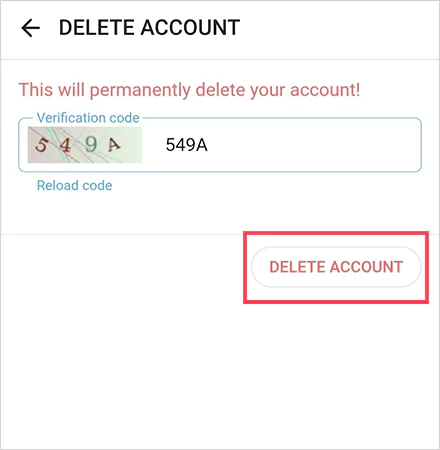
Deleting an OnlyFans account is not the same as logging out or stopping subscriptions. Once you delete your account, it is permanently removed from the platform. Your profile disappears, your username is disconnected, and you lose access to everything associated with the account.
For subscribers, this means losing access to paid subscriptions, private messages, and any photos or videos you previously purchased. For creators, deletion removes your entire creator profile, uploaded content, earnings history, and analytics. Once the process is complete, there is no way to reverse it.
Because of this permanence, OnlyFans includes confirmation steps to make sure the decision is intentional.
20 Best Indian OnlyFans Creators to Follow
Important Things to Know Before Deleting Your OnlyFans Account
Before starting the deletion process, it’s important to understand the consequences clearly. Many users rush into deletion and later realize they’ve lost access to content or funds they wanted to keep.
If you are a subscriber, deleting your account immediately cuts off access to all subscriptions, even if you recently paid. Any remaining subscription time is forfeited. Messages, tips, and purchased content are also permanently lost.
If you are a creator, the stakes are higher. Any unpaid balance should be withdrawn before deleting your account. Once deleted, you will no longer be able to access payouts, even if earnings were pending. Active subscribers will automatically lose access to your content once the account is removed.
OnlyFans may retain limited account information internally for legal or regulatory purposes, but your public profile and content are removed from the platform.
How to Delete an OnlyFans Account Using a Desktop Browser
Deleting your OnlyFans account through a desktop or laptop browser is the most reliable method, as all account settings are fully accessible.
Follow these steps carefully:
- Log in to your OnlyFans account using a web browser.
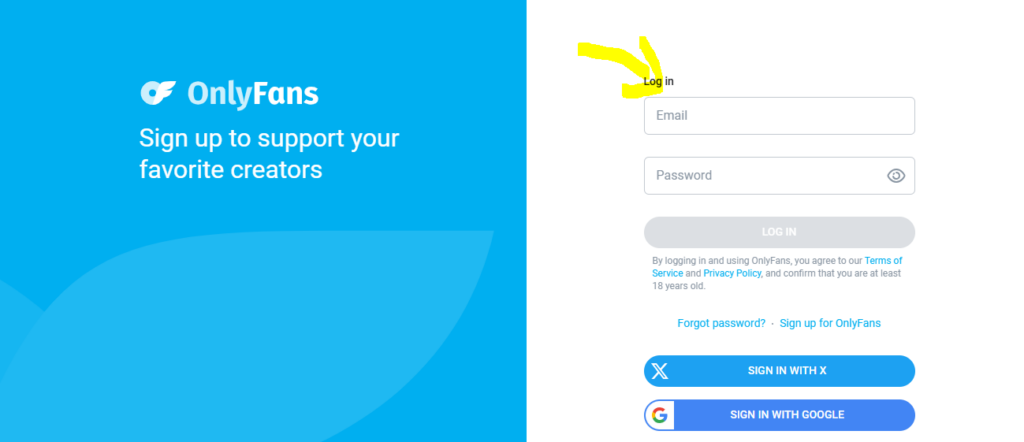
- Click on your profile picture in the top-left corner.

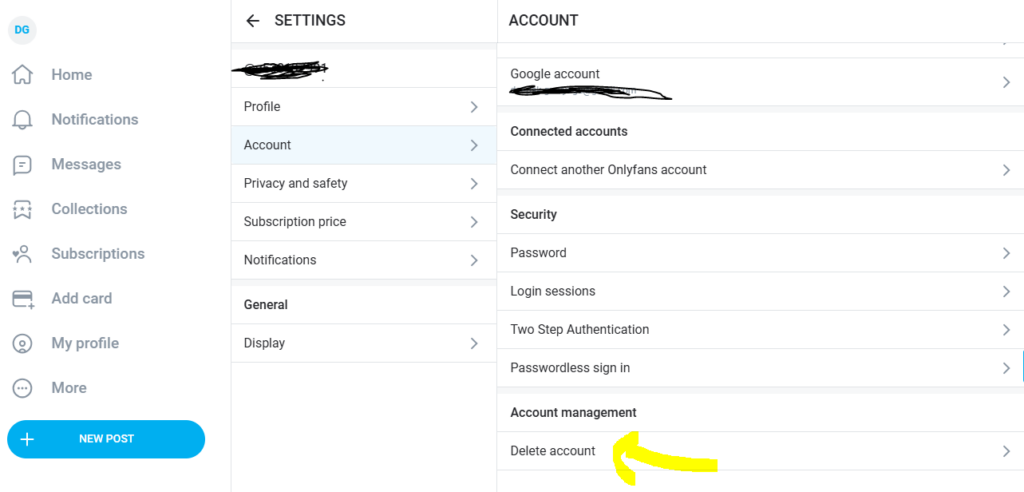
- Select Settings from the dropdown menu.

- Open the Account tab.
- Enter the verification code sent to your registered email or phone number.
- Confirm the deletion request.
Once confirmed, your account will be scheduled for permanent deletion, and you will be logged out automatically.
How to Delete an OnlyFans Account on Mobile (Android and iPhone)
The OnlyFans mobile app does not support full account deletion, so you must use a mobile web browser to complete the process.
Follow these steps:
- Open Chrome, Safari, or another mobile browser.
- Visit the OnlyFans website and log in to your account.
- Tap your profile icon to access the menu.
- Go to Settings, then open the Account section.
- If the delete option is not visible, enable Desktop Site / Desktop View in your browser.
- Tap Delete Account.
- Enter the verification code sent to your email or phone.
- Confirm your deletion request.
After confirmation, your OnlyFans account will be permanently removed and cannot be recovered.
Top 15 Hottest Instagram Models that Have OnlyFans
How to Delete an OnlyFans Creator Account Safely
Creators need to take extra precautions before deleting their accounts. Unlike subscribers, creators deal with payments, chargebacks, and subscription cycles that can complicate deletion.
Before deleting, make sure your earnings balance is zero. Withdraw all available funds and confirm that there are no pending payouts. If you have active subscriptions, it’s best to wait until they expire to avoid disputes or confusion.
Creators should also review any ongoing chargebacks or account warnings. Deleting during an unresolved issue can create complications with payment processors.
Once everything is settled, creators can follow the same deletion steps found in account settings. After deletion, all creator content is permanently removed, and fans will no longer be able to view your profile.
Canceling Subscriptions Before Deleting Your Account
While OnlyFans allows account deletion even if subscriptions are active, canceling them first is a smart move. This ensures clarity and prevents billing misunderstandings.
To cancel a subscription, visit the creator’s profile, open the subscription settings, and turn off auto-renew. You will still have access until the current billing period ends, but once your account is deleted, access stops immediately regardless of remaining time.
Canceling subscriptions also gives you a chance to save or review anything you want before deleting your account.
Common Reasons Users Cannot Delete Their OnlyFans Account
Some users encounter problems when trying to delete their accounts. In most cases, these issues are temporary and easy to fix.
Active subscriptions can sometimes block deletion, especially if billing is in progress. Pending payouts or payment verification issues can also prevent creators from completing the process. In other cases, browser-related problems such as cached data or outdated sessions interfere with settings visibility.
Switching browsers, clearing cache, or waiting a short period often resolves these issues. If the delete option still doesn’t appear, OnlyFans support can help.
Top 10 Highest Paid Onlyfans Models in 2026
How Long Does It Take for OnlyFans to Delete an Account?
Once you confirm deletion, the process usually completes quickly. Many users find their accounts become inaccessible almost immediately. In some cases, deletion may take a short processing period, especially for creator accounts with financial activity.
After deletion, you will no longer be able to log in or recover your account. Any attempt to sign in will result in an error message.
Can a Deleted OnlyFans Account Be Recovered?
No. Once an OnlyFans account is deleted, it cannot be restored. This includes usernames, content, messages, and earnings data.
If you decide to return to OnlyFans in the future, you will need to create a brand-new account. This is why users who feel uncertain often choose to cancel subscriptions or stop using the platform rather than deleting immediately.
Contacting OnlyFans Support for Account Deletion Issues
If you experience technical problems or account restrictions that prevent deletion, contacting OnlyFans support is the best option. You can submit a request through the official help center.
When contacting support, include your registered email address, username, and a clear explanation of the issue. This helps speed up the response process. Support typically replies via email with instructions or confirmation.
Alternatives to Deleting Your OnlyFans Account
Permanent deletion is not the only way to step away from OnlyFans. Many users prefer less drastic options, especially if they think they may return later.
You can cancel all subscriptions, remove saved payment methods, and stop using the account without deleting it. Creators can stop posting content or disable subscriptions while keeping their accounts inactive. These options preserve your data while giving you a break from the platform.
15 Best Free OnlyFans Accounts You Should Follow
Privacy and Data Considerations After Deletion
Many users worry about what happens to their personal data after deleting an OnlyFans account. While your public profile and content are removed, OnlyFans may retain limited information internally for compliance, fraud prevention, or legal reasons.
However, your profile will no longer appear in searches, and other users will not be able to access your content or messages.
Frequently Asked Questions About Deleting an OnlyFans Account
Deleting an OnlyFans account is completely free. There are no deletion fees or penalties.
Usernames are not always immediately reusable after deletion. In some cases, usernames may remain unavailable to prevent impersonation.
Deleted profiles cannot be searched or viewed by other users. Any links to your old profile will stop working.
Chargebacks or payment disputes initiated before deletion may still be processed through payment providers, even after the account is removed.
Final Thoughts
Deleting an OnlyFans account is a personal decision, and it’s important to approach it carefully. Whether you are a subscriber or a creator, taking a few minutes to review subscriptions, withdraw funds, and understand the consequences can prevent regrets later.
If you are confident about leaving the platform, the deletion process is simple and secure. Follow the steps outlined in this guide, confirm your request, and your account will be permanently removed.
For those who are unsure, alternatives like canceling subscriptions or stepping away temporarily may offer a better solution. Whatever you choose, understanding the process ensures you stay in control of your account and your data.