

For a while now, there has been a small hint in Snapchat’s Quick Add contacts section – people you might get to follow based on 3+ mutual friends. Now, everybody wants to know if you can actually see mutual friends on Snapchat.
Why don’t I ever get to see a list of mutual friends on Snapchat the way I do on Instagram? Given that Instagram projects connections openly, and that Snapchat is otherwise a clandestine, minimalist, and generally secretive app, this must be a feature choice. Instead of full-on information, Snapchat provides hints or “trail” of connection.
Let’s break it all out in a real world context so you can actually understand the content and use it intelligently.
Can You See Mutual Friends on Snapchat?
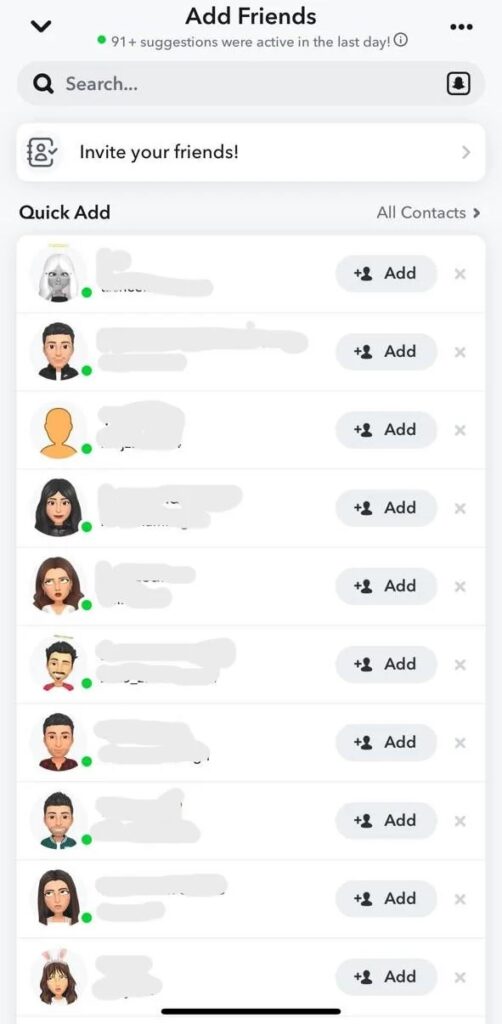
Here’s the honest answer: Yes—but not completely.
While on Snapchat you can find out how many mutual friends you and another user have, you cannot view the individual mutual friends’ names or their profiles.
For the first time with any of the social platforms, you cannot stalk (nicely) and find which friend connects you to someone else.
Why?
Snapchat is all about privacy. Unlike other social media platforms, your friends list will be private, and your friends’ friends lists will also be kept discreet.
150+ Cool & Creative Snapchat Bio Ideas for 2025
Why Snapchat Hides Mutual Friend Names
This might feel annoying, but it’s actually intentional.
Unlike other social media platforms, Snapchat was built with a different vision in mind, one that encompasses privacy and performance in unique ways.
So instead of exposing social circles, it:
- Protects user connections
- Prevents unwanted stalking or judgment
- Keeps interactions more personal
Think of it like this:
Snapchat shows hints, not details.
How to See Mutual Friends on Snapchat (Step-by-Step)

Even though you can’t see exact names, you can identify mutual connections using a simple method.
1. Open Snapchat
Launch the app and stay on the main camera screen.
2. Tap “Add Friends”
Look at the top-right corner and tap the + icon (Add Friends).
3. Go to “Quick Add”
Scroll down to the Quick Add section.
4. Look for “X Mutual Friends”
Under some usernames, you’ll see something like:
- “2 mutual friends”
- “5+ mutual friends”
That’s your clue—you share connections with that person.
How to Use Snapchat For Customer Service
What Does “Mutual Friends” Actually Mean?
When Snapchat shows “3 mutual friends,” it simply means:
Three people on your friend list also have that person added.
But here’s the catch:
- You won’t know which three
- You can’t click to view them
- There’s no hidden setting to unlock this
It’s intentionally vague.
Can You See Mutual Friends from Contacts?
Yes—kind of.
If you sync your phone contacts with Snapchat, the app may suggest people you already know. In some cases, these suggestions overlap with mutual friends.
So while it’s not direct, you might guess the connection based on:
- Saved contacts
- Shared friend circles
- School/college networks
Can You See Mutual Friends in Groups?
Another small trick:
If you and someone are in the same group chat, Snapchat may show something like:
“In X groups with you”
This doesn’t directly say “mutual friends,” but it still indicates a shared social circle.
What Does ‘WRD’ Mean on Snapchat
Is There Any Way to See Exact Mutual Friends?
Short answer: No.
Long answer: Still no—but with context.
There is:
- No official feature
- No hidden setting
- No third-party app (safe ones, at least)
Any website or app claiming to reveal exact mutual friends is either:
- Misleading
- Unsafe
- A privacy risk
So don’t fall for those tricks.
What Reddit Users Say About Mutual Friends
A lot of users online have asked the same question—and the frustration is real.
From discussions like this:
“I see someone with 10+ mutual friends… but can’t see who.”
That pretty much sums up the Snapchat experience.
You know the connection exists… you just don’t know where.
What Does ML Mean on Snapchat? Understanding Snap Lingo
Tips to Figure Out Mutual Friends (Smartly)
Even though Snapchat hides names, you can still play detective (without being creepy ):
1. Think About Your Circles
Ask yourself:
- School?
- Coaching?
- College?
- Work?
Most mutuals come from shared environments.
2. Check Recently Added Friends
If you recently added someone new, they might be the link.
3. Look at Group Chats
Common groups often reveal overlapping friend circles.
4. Use Context Clues
Username, Bitmoji, and name often hint at identity.
Snapchat vs Other Apps (Quick Comparison)
Let’s be real—Snapchat is stricter than most platforms.
Should You Care About Mutual Friends?
Let’s be real—Snapchat is stricter than most platforms.
| Platform | Mutual Friends Visibility |
| Snapchat | Only shows count |
| Shows names + list | |
| Shows mutual friends clearly |
Snapchat clearly prioritizes privacy over curiosity.
Should You Care About Mutual Friends?
Honestly? Not too much.
Mutual friends can help you:
- Decide if someone is legit
- Feel safer adding new people
But beyond that, they don’t define your connection.
Sometimes, the best friendships on Snapchat start randomly—not through shared circles.
Final Thoughts
So, can you see mutual friends on Snapchat?
Yes, but only the number—not the names.
Snapchat keeps things intentionally limited:
- You get a hint of shared connections
- But never the full picture
And maybe that’s the point.
It’s a world of total visibility, and yet the ephemeral nature of Snapchat seems to inspire continued loyalty from users.