

Anyone who posts regularly on social media runs into the same small problem: a photo is fine, but it needs words on it. A quote card, a promo banner, a Story overlay with the date and location of an event. Most desktop design tools handle this with templates and layers, which works, but it also means opening a browser tab, waiting on a canvas to load, and fighting with an interface built for brand kits rather than a single caption.
Mobile text-on-image apps came out of that gap. They tend to be narrow by design: one picture, a few text objects, some stickers, done in under two minutes. The trade-off is usually control. You get five fonts and a drop shadow, and that’s the ceiling.
Where PixelLab fits
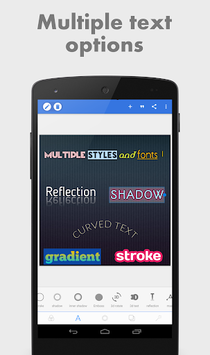
PixelLab – Text on pictures, published under the developer name App Holdings, sits further along the control axis than most apps in its category. It’s filed under Photography on the Play Store, but in practice it behaves like a lightweight graphics editor that happens to be built around type.
The pitch is straightforward: draw, add text (simple and 3D), drop in stickers, and edit images for free. What makes it worth covering is the depth under that pitch. The listing mentions more than 60 customizable options, and that number tracks with how the app actually feels once you start poking at a text layer.
Text handling
Text objects are unlimited, and each one carries its own settings rather than inheriting a global style. That matters when you’re building a quote post with a large pull line, a smaller attribution, and a handle in the corner, all needing different treatments.
The 3D text feature is the one people usually show up for. It extrudes lettering with adjustable depth and angle, which is the kind of effect that normally lives in desktop software and takes a tutorial to figure out.
Beyond type
Supporting features round it out without bloating the app:
- Freehand drawing directly on the image
- A sticker library plus the option to import your own
- Background presets and transparent-background export
- Shapes for badges, dividers and highlight blocks
- A font selection you can extend with your own files
That last point is the one brand-conscious users care about. If your company has a licensed typeface, you can load it rather than approximating it.
Social media use cases
For a small marketing team or a solo creator, the practical appeal is speed on repeat tasks. Quote graphics in a consistent house style. Thumbnail text that stays legible at small sizes. Announcement cards where only the date changes week to week.
The app also has an official YouTube tutorial playlist linked from its store page, which is more useful than it sounds, since several of the 3D and shadow controls aren’t self-explanatory on first contact.
It is not a layout tool. There’s no multi-page document, no brand asset manager, no collaboration. If your workflow involves handing files to a colleague mid-edit, this isn’t that.
PixelLab on Windows
The app ships for Android only, so running it on a desktop means putting an Android environment on your machine. Plenty of people do, mostly because dragging a 4000-pixel product photo into the editor from a folder beats emailing it to yourself first.
If you’re working from a stock photo library that already lives on your hard drive, the route most people take is to download PixelLab APK for PC and run it inside an Android environment, which takes a few minutes and keeps your source images in the same place as your exports. BlueStacks is the common choice for this. Some prefer LDPlayer for its lighter footprint on older hardware.
One practical note specific to this app: PixelLab’s canvas is touch-oriented, and precise nudging of a text layer with a mouse feels different from dragging with a thumb. Most of the fine positioning happens through numeric fields anyway, so it adapts better than drawing-heavy apps do.
Worth knowing first
PixelLab is free with ads, and some assets sit behind in-app purchases. For occasional use that’s a non-issue. For daily output it’s worth checking what’s unlocked before you commit a workflow to it.
Also check your export settings early. The app can output at high resolution, but if you start from a low-res source image, no amount of 3D lettering will save it at full size on a desktop feed.